
STASHIO / EXPLORE THE POSSIBILITIES

One little library.
A world of possibilities.

Find the right tool for what you have in mind. From an article worth reading to a whole trip together.

154 tools & capabilities10 topics to exploreVI / EN

154 directory entries

Capture & import

19
CoreIllustration: Save without losing your flowILLUSTRATED WORKFLOWShare to saveSave links, images and documents from your phone’s share sheet.See how it works
iPhone · iPadAndroid · Tablet

Try it in the app

Open the content → Share → Stashio. Open Library to see the saved item and processing status.

Device setup guide ↗
CoreIllustration: Save without losing your flowILLUSTRATED WORKFLOWOne click from ChromeKeep the page you are reading from the browser toolbar.See how it works
Chrome

Try it in the app

Install the extension and pair your phone. Open a page → Stashio icon → Save this page.

Device setup guide ↗
CoreIllustration: Save without losing your flowILLUSTRATED WORKFLOWSave a selectionKeep a useful passage or link from the right-click menu.See how it works
Chrome

Try it in the app

Select text or right-click a link → choose Save to Stashio.

Device setup guide ↗
CoreIllustration: Save without losing your flowILLUSTRATED WORKFLOWPaste a placeTurn a message about a place into a useful, structured note.See how it works
iPhone · iPadAndroid · TabletWeb

Try it in the app

In Library, open the add-place/paste action. Paste the text, review the detected fields and save.

Device setup guide ↗
Allowances applyIllustration: Say it. Keep it.ILLUSTRATED WORKFLOWCapture a voice noteRecord an idea when typing is inconvenient. Transcription depends on processing and AI allowances.See how it works
iPhone · iPadAndroid · TabletWeb

Try it in the app

Choose the Library microphone, grant permission when prompted, record and save. Allow time for processing.

Device setup guide ↗
Allowances applyIllustration: Save without losing your flowILLUSTRATED WORKFLOWImages, PDFs and filesKeep documents alongside the links that give them context.See how it works
iPhone · iPadAndroid · TabletWeb

Try it in the app

On your phone, share a file to Stashio. On the web, use the Library add/upload action.

Device setup guide ↗
CoreIllustration: Save without losing your flowILLUSTRATED WORKFLOWYour own notesGive your own thoughts a home in your library.See how it works
iPhone · iPadAndroid · TabletWeb

Try it in the app

Open Library → add a note → enter the text → save.

Device setup guide ↗
CoreIllustration: One library, many screensILLUSTRATED WORKFLOWSave progress beyond the appFollow processing through a supported iPhone Live Activity or an Android notification.See how it works
iPhone · iPadAndroid · Tablet

Try it in the app

Share content to Stashio. Allow Live Activities/notifications to see progress where supported. Live Activities require a compatible iOS version, device and connection.

Device setup guide ↗
CoreIllustration: Save without losing your flowILLUSTRATED WORKFLOWKeep a save when offlineThe mobile outbox keeps a save ready to upload when connectivity returns.See how it works
iPhone · iPadAndroid · Tablet

Try it in the app

Share content while offline. Reopen Stashio when online to upload and process it; AI requires a server connection.

Device setup guide ↗
CoreIllustration: Save without losing your flowILLUSTRATED WORKFLOWCopied it? Keep it.A quick save prompt for freshly copied content when you return to the app.See how it works
iPhone · iPadAndroid · Tablet

Try it in the app

Copy a link → open Stashio → choose Paste on the clipboard prompt.

Device setup guide ↗
Availability variesIllustration: Save without losing your flowILLUSTRATED WORKFLOWEmail saving when availableBring an email into your library when inbound mail is enabled for your account.See how it works
iPhone · iPadAndroid · Tablet

Try it in the app

Requires Premium and an operational inbound-mail service. Check Forward to save in the app and confirm availability with support before using it. End-to-end delivery on the public release has not been verified.

Device setup guide ↗
Allowances applyIllustration: Save without losing your flowILLUSTRATED WORKFLOWBring your old library alongImport bookmarks and supported exports from Pocket or Instapaper.See how it works
iPhone · iPadAndroid · TabletWeb

Try it in the app

Open Import, choose a compatible export and review the result. Supported formats are listed in the import screen.

Device setup guide ↗
CoreIllustration: Save without losing your flowILLUSTRATED WORKFLOWChoose a Space as you shareFile a save into the right Space from the mobile share card.See how it works
iPhone · iPadAndroid · Tablet

Try it in the app

Create and open a Space first. Share to Stashio → select its name when the Space chips appear on the save card.

Device setup guide ↗
Allowances applyIllustration: Save without losing your flowILLUSTRATED WORKFLOWCapture a photo in the appCapture a sign, object or document for your library.See how it works
iPhone · iPadAndroid · Tablet

Try it in the app

Open the photo/camera action in Library, allow camera access and capture. Review and save; content recognition uses AI allowances.

Device setup guide ↗
CoreIllustration: Save without losing your flowILLUSTRATED WORKFLOWAndroid Direct Share shortcutReach Stashio from Android’s suggested sharing row when the system offers it.See how it works
Android · Tablet

Try it in the app

Open Android’s share sheet and choose Save to Stashio when suggested. Placement is system-controlled; Stashio remains available in the app list.

Device setup guide ↗
Allowances applyIllustration: Save without losing your flowILLUSTRATED WORKFLOWAutomatic titles, previews and tagsNew saves gain useful details after processing to make browsing easier.See how it works
iPhone · iPadAndroid · TabletWeb

Try it in the app

Save content → allow processing → review its generated title, preview and tags. Edit your own save if something is inaccurate.

Device setup guide ↗
CoreIllustration: Save without losing your flowILLUSTRATED WORKFLOWRetry or name a failed saveReview a failed save and choose what to do when content cannot be read.See how it works
iPhone · iPadAndroid · Tablet

Try it in the app

Open a failed save or its Library notice. Retry, name it yourself or reread the photo when those actions are available.

Device setup guide ↗
CoreIllustration: Save without losing your flowILLUSTRATED WORKFLOWWeb drafts and conflicts across tabsKeep unfinished text in the browser and resolve edits from two tabs.See how it works
Web

Try it in the app

Compose in Library. Offline drafts stay locally. If another tab changes a draft, choose this version, the other version or keep both. A draft has not yet been uploaded.

Device setup guide ↗

Read, listen & understand

19
Allowances applyIllustration: From a long read to a lasting ideaILLUSTRATED WORKFLOWSummaries & key pointsUnderstand the gist before committing to a long read.See how it works
iPhone · iPadAndroid · TabletWeb

Try it in the app

Open a processed article. Read the summary first, then open the reader to go deeper.

Device setup guide ↗
CoreCaptured Stashio interface with sample contentAPP CAPTURE · SAMPLE CONTENTA calmer readerFocus on the extracted article content.See how it works
iPhone · iPadAndroid · TabletWeb

Try it in the app

Open an article → Read full article. Adjust the reading display in the reader.

Device setup guide ↗
Allowances applyIllustration: From a long read to a lasting ideaILLUSTRATED WORKFLOWListen to articlesKeep up with a saved article while giving your eyes a break.See how it works
iPhone · iPadAndroid · TabletWeb

Try it in the app

Open an article with readable content → Listen. Use playback and speed controls. Server voices require Premium; device voices vary by platform.

Device setup guide ↗
Allowances applyIllustration: From a long read to a lasting ideaILLUSTRATED WORKFLOWTranslate what you readTranslate supported content as you read.See how it works
iPhone · iPadAndroid · TabletWeb

Try it in the app

Open the reader → choose translation and a language. Wait for the translated text.

Device setup guide ↗
Allowances applyIllustration: From a long read to a lasting ideaILLUSTRATED WORKFLOWKeep a meaningful passageHighlight useful passages and revisit them in one place.See how it works
iPhone · iPadAndroid · TabletWeb

Try it in the app

Select a passage in the reader → highlight it. Open Highlights to revisit it.

Device setup guide ↗
Allowances applyIllustration: From a long read to a lasting ideaILLUSTRATED WORKFLOWRead text in imagesAI can recognize text in images to help you find their contents again.See how it works
iPhone · iPadAndroid · TabletWeb

Try it in the app

Save a clear image containing text, allow processing, then review the recognized content in the saved item.

Device setup guide ↗
Allowances applyIllustration: From a long read to a lasting ideaILLUSTRATED WORKFLOWUseful details at a glanceAddresses, hours or ingredients can become easy-to-scan details.See how it works
iPhone · iPadAndroid · TabletWeb

Try it in the app

Open a processed item and review its detail fields. Check against the original source before using them.

Device setup guide ↗
Allowances applyCaptured Stashio interface with sample contentAPP CAPTURE · SAMPLE CONTENTCook step by stepFollow a saved recipe one step at a time.See how it works
iPhone · iPadAndroid · TabletWeb

Try it in the app

Open a recipe with detected steps → Cook step by step. Advance as you finish each step.

Device setup guide ↗
CoreIllustration: From a long read to a lasting ideaILLUSTRATED WORKFLOWA watch-later queueKeep video links ready for when you have time.See how it works
iPhone · iPadAndroid · TabletWeb

Try it in the app

Open a saved video. Play supported content or open the original; playback depends on the source.

Device setup guide ↗
Allowances applyIllustration: From a long read to a lasting ideaILLUSTRATED WORKFLOWKeep the words in a videoFor supported sources, process speech and on-screen text so the content can be found again.See how it works
iPhone · iPadAndroid · TabletWeb

Try it in the app

Save a video link → wait for processing → open the extracted content. Availability and processed duration depend on the source, plan and allowances.

Device setup guide ↗
CoreIllustration: From a recipe to your tableILLUSTRATED WORKFLOWFrom recipes to a shopping listGather ingredients from selected recipes and tick them off while shopping.See how it works
iPhone · iPadAndroid · Tablet

Try it in the app

Select recipes in Library → Shopping list. Review and check off ingredients; this list is stored on the device.

Device setup guide ↗
Allowances applyIllustration: From a long read to a lasting ideaILLUSTRATED WORKFLOWTurn a highlight into a quote cardShare a highlighted passage as a readable image.See how it works
iPhone · iPadAndroid · Tablet

Try it in the app

Open Highlights → choose a passage → quote card/share image.

Device setup guide ↗
Allowances applyIllustration: From a long read to a lasting ideaILLUSTRATED WORKFLOWAction items from a saveReview recognized action items and check them off.See how it works
iPhone · iPadAndroid · Tablet

Try it in the app

Open a save with action items → review each step → check it off. These checkmarks are kept on the device.

Device setup guide ↗
Allowances applyIllustration: From a long read to a lasting ideaILLUSTRATED WORKFLOWProduct specificationsReview specifications extracted from a supported product page.See how it works
iPhone · iPadAndroid · Tablet

Try it in the app

Save a product page with suitable data → open Specifications after processing. Check details with the store.

Device setup guide ↗
Allowances applyIllustration: From a long read to a lasting ideaILLUSTRATED WORKFLOWSelect and copy text in a photoOpen a photo full screen to copy a useful line of text.See how it works
iPhone · iPadAndroid · Tablet

Try it in the app

Open a saved photo full screen, use text selection/recognition where offered, then copy. Recognition depends on the photo and device.

Device setup guide ↗
PremiumIllustration: From a long read to a lasting ideaILLUSTRATED WORKFLOWChoose a reading voiceChoose from available server voices instead of the default.See how it works
iPhone · iPadAndroid · TabletWeb

Try it in the app

Open Settings → Listen/Reading voice → choose an available voice. Return to an article to try it; languages and voices depend on the current service.

Device setup guide ↗
Allowances applyIllustration: From a long read to a lasting ideaILLUSTRATED WORKFLOWPlayback and lock-screen controlsPause, resume and adjust article playback.See how it works
iPhone · iPadAndroid · Tablet

Try it in the app

Start Listen in an article and try speed and playback controls. Where background playback is supported, use the lock-screen controls.

Device setup guide ↗
CoreIllustration: From a long read to a lasting ideaILLUSTRATED WORKFLOWCopy highlights as textCopy one highlight, an article’s highlights or the displayed list.See how it works
Web

Try it in the app

Open Highlights → copy a passage, an article’s highlights or the whole displayed list. The list is capped, rather than a full-history export.

Device setup guide ↗

Organize & search

19
PremiumIllustration: A little memory is enoughILLUSTRATED WORKFLOWSearch by meaningSearch by meaning when the exact title escapes you.See how it works
iPhone · iPadAndroid · TabletWeb

Try it in the app

With Premium, search using a natural description. Content must be processed to support semantic search.

Device setup guide ↗
Allowances applyIllustration: A little memory is enoughILLUSTRATED WORKFLOWAsk your libraryAsk a question and follow the saved sources cited in the answer.See how it works
iPhone · iPadAndroid · TabletWeb

Try it in the app

Open Ask → enter a question about your saves → read the answer and open its sources.

Device setup guide ↗
Allowances applyCaptured Stashio interface with sample contentAPP CAPTURE · SAMPLE CONTENTA Space for every subjectBring a trip, project or interest together in one place.See how it works
iPhone · iPadAndroid · TabletWeb

Try it in the app

Open Spaces → create a Space → name it. Add related items from Library.

Device setup guide ↗
CoreIllustration: A little place for everythingILLUSTRATED WORKFLOWContent tagsMove from one save to others with a related tag.See how it works
iPhone · iPadAndroid · TabletWeb

Try it in the app

Open a saved item → select a tag to see related saves.

Device setup guide ↗
Allowances applyIllustration: A little place for everythingILLUSTRATED WORKFLOWTopic dossiersExplore connections between items in your library.See how it works
iPhone · iPadAndroid · TabletWeb

Try it in the app

Open Dossiers from the Library menu. Choose a topic to explore its related items.

Device setup guide ↗
CoreIllustration: A little place for everythingILLUSTRATED WORKFLOWClear your save inboxWork through saves and keep your library manageable.See how it works
iPhone · iPadAndroid · TabletWeb

Try it in the app

Open Save inbox → review each item → choose an action. The web includes keyboard controls.

Device setup guide ↗
CoreIllustration: A little place for everythingILLUSTRATED WORKFLOWTidy duplicates & failuresReview items that need attention before deciding what to keep.See how it works
iPhone · iPadAndroid · TabletWeb

Try it in the app

Open Tidy up from the Library menu. Review each suggestion before confirming changes.

Device setup guide ↗
CoreIllustration: A little place for everythingILLUSTRATED WORKFLOWAdd context to a saved itemKeep your own thoughts next to a saved article, product or place.See how it works
iPhone · iPadAndroid · Tablet

Try it in the app

Open a save → Notes → add text → Save. This attaches a note to that item, rather than creating a new standalone save.

Device setup guide ↗
CoreIllustration: A little place for everythingILLUSTRATED WORKFLOWEdit extracted informationCorrect the title, text and extracted details of a save you own.See how it works
iPhone · iPadAndroid · Tablet

Try it in the app

Open your own save → Edit → update the relevant fields → Save. A save viewed through someone else’s Space may not be editable.

Device setup guide ↗
Allowances applyIllustration: A little place for everythingILLUSTRATED WORKFLOWAttach photos, files and voice to a saveKeep extra material attached to the save it belongs with.See how it works
iPhone · iPadAndroid · Tablet

Try it in the app

Open a save → Extras → choose a supported photo, file, note or voice memo. Wait for upload; attachments use your plan’s storage allowance.

Device setup guide ↗
CoreIllustration: A little place for everythingILLUSTRATED WORKFLOWBrowse by type and dateSwitch between articles, photos, recipes and other save types.See how it works
iPhone · iPadAndroid · TabletWeb

Try it in the app

In Library, choose a content-type filter and browse saves by date. Clear it to see all saves again.

Device setup guide ↗
CoreIllustration: A little place for everythingILLUSTRATED WORKFLOWAct on multiple savesSelect several saves to file into a Space or apply a bulk action.See how it works
iPhone · iPadAndroid · Tablet

Try it in the app

Library → Select → mark saves → choose an available toolbar action. Review the selection before deleting.

Device setup guide ↗
CoreIllustration: A little place for everythingILLUSTRATED WORKFLOWAdd an existing save to a SpaceReuse a library save in a topic or shared Space.See how it works
iPhone · iPadAndroid · TabletWeb

Try it in the app

Open a save → Add to Space → choose one; or use Add items inside a Space.

Device setup guide ↗
Allowances applyIllustration: A little place for everythingILLUSTRATED WORKFLOWSuggested smart groupsDiscover clusters of saves that could belong in a Space.See how it works
iPhone · iPadAndroid · Tablet

Try it in the app

Open Spaces → Smart groups when suggestions are available → review the saves before creating or using the group.

Device setup guide ↗
CoreIllustration: A little place for everythingILLUSTRATED WORKFLOWSort and pin inside a SpaceBrowse by type, date, distance or votes and keep important saves visible.See how it works
iPhone · iPadAndroid · Tablet

Try it in the app

Open a Space → sort menu. Choose a view; use item actions to pin, rename or reorder where available.

Device setup guide ↗
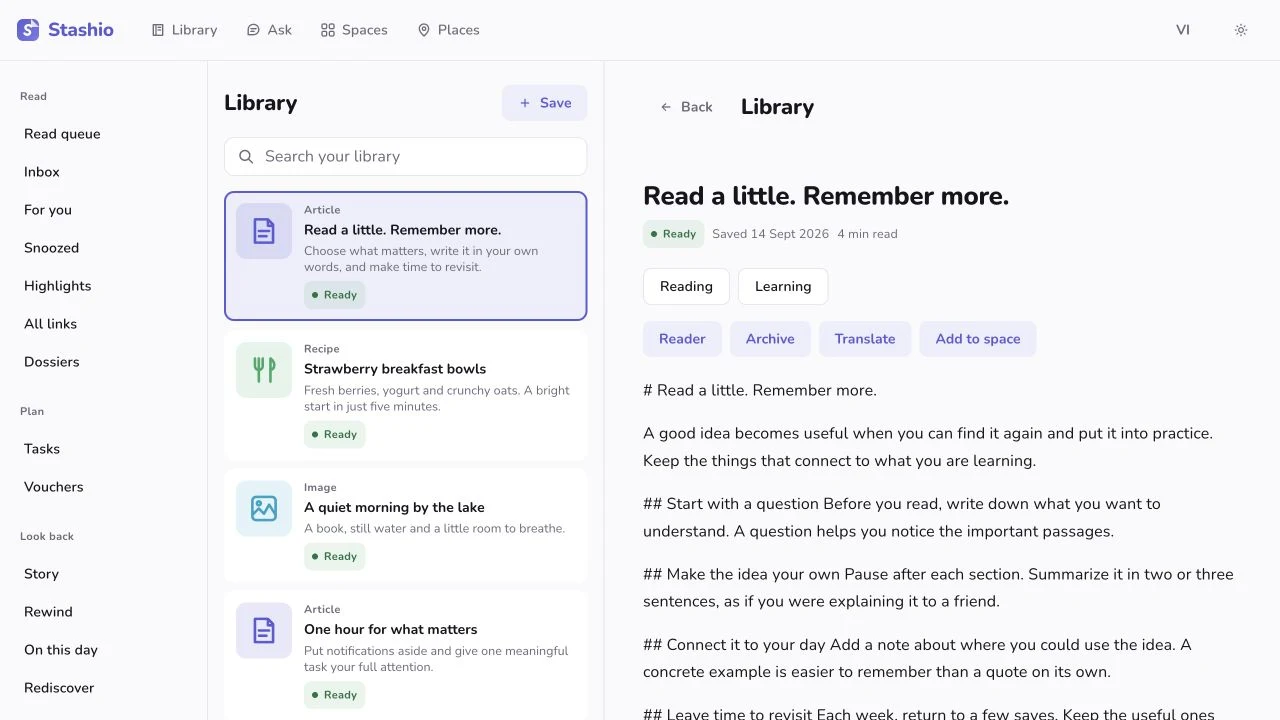
CoreCaptured Stashio interface with sample contentAPP CAPTURE · SAMPLE CONTENTSide-by-side web workspaceBrowse your list and read the selected save alongside it in a wide window.See how it works
Web

Try it in the app

Widen the web window → select a Library item. Narrow it to return to the small-screen layout.

Device setup guide ↗
CoreIllustration: A little place for everythingILLUSTRATED WORKFLOWKeyboard triage in the inboxBrowse, open, archive and undo without constantly reaching for the mouse.See how it works
Web

Try it in the app

Open the web Save inbox → press ? for shortcuts. Use j/k to move, o to open, e to archive and u to undo where available.

Device setup guide ↗

Places & maps

09
Allowances applyIllustration: Places you want to goILLUSTRATED WORKFLOWYour places on a mapSee saved places together on a map.See how it works
iPhone · iPadAndroid · TabletWeb

Try it in the app

Open Places. Select a pin to view its saved item and directions when available.

Device setup guide ↗
CoreIllustration: Places you want to goILLUSTRATED WORKFLOWWhat’s saved nearby?Sort saved places by distance and find somewhere to visit today.See how it works
iPhone · iPadAndroid · Tablet

Try it in the app

Open Places → Nearby. Allow location to see distances, then select a place to focus its map pin.

Device setup guide ↗
Allowances applyIllustration: Places you want to goILLUSTRATED WORKFLOWDirections to a saved placeSee a route from your location and open a maps app for navigation.See how it works
iPhone · iPadAndroid · TabletWeb

Try it in the app

Open Places → select a pin → directions. Allow location when needed; estimated routes are labelled in the interface.

Device setup guide ↗
Allowances applyIllustration: Turn an idea into a tripILLUSTRATED WORKFLOWYour trip, in progressKeep distance and estimated arrival in view while moving around the app.See how it works
iPhone · iPadAndroid · Tablet

Try it in the app

Choose a place → Go here. Open the trip bar for ETA or to end the trip. Supported iPhones offer Live Activities; Android has a trip notification. Background updates require the relevant permissions and settings.

Device setup guide ↗
CoreIllustration: The right place. The right moment.ILLUSTRATED WORKFLOWA reminder when you’re nearbyOn iPhone, get a reminder near a place you previously saved.See how it works
iPhone

Try it in the app

On iPhone: Settings → Right Here reminders. Enable it, allow Always location and notifications. Delivery depends on the system and quiet hours. This background location reminder is not currently offered on Android.

Device setup guide ↗
CoreIllustration: The right place. The right moment.ILLUSTRATED WORKFLOWArrive somewhere you’ve savedTrip Radar on iPhone resurfaces a cluster of saved places when you arrive in the area.See how it works
iPhone

Try it in the app

Requires several geocoded saves in one area, Right Here enabled and background location on iPhone. Open the arrival reminder to revisit the trip.

Device setup guide ↗
Allowances applyIllustration: Places you want to goILLUSTRATED WORKFLOWA map for your tripSee the places in a Space or stops in itinerary order.See how it works
iPhone · iPadAndroid · TabletWeb

Try it in the app

Open a Space → Map. Switch between all places and itinerary order. Stops need coordinates; estimated routes are labelled.

Device setup guide ↗
Allowances applyIllustration: Places you want to goILLUSTRATED WORKFLOWA whole route from one saveA save containing several destinations can become a map of stops.See how it works
iPhone · iPadAndroid · Tablet

Try it in the app

Open a save with multiple recognized places → route map → Open in Google Maps. Missing coordinates and waypoint limits can shorten the route.

Device setup guide ↗
CoreIllustration: Places you want to goILLUSTRATED WORKFLOWLabel what a place is forLabel a place for staying, coffee, a buffet or another activity.See how it works
iPhone · iPadAndroid · Tablet

Try it in the app

Open a place → Activities → choose suitable labels.

Device setup guide ↗

Together & realtime

15
Allowances applyIllustration: Keep the group in the loopILLUSTRATED WORKFLOWTalk inside a SpaceKeep conversations, photos and files alongside shared plans.See how it works
iPhone · iPadAndroid · TabletWeb

Try it in the app

Open a shared Space → Chat → send a message or file. Web can play voice messages but does not record them in chat.

Device setup guide ↗
Allowances applyIllustration: Keep the group in the loopILLUSTRATED WORKFLOWInvite someone alongInvite with a code or link to organize together.See how it works
iPhone · iPadAndroid · TabletWeb

Try it in the app

Open a Space → Members/Invite → share the code or link with the person you want to invite.

Device setup guide ↗
Allowances applyIllustration: Keep the group in the loopILLUSTRATED WORKFLOWShare the jobsLet everyone take a task and see who is doing what.See how it works
iPhone · iPadAndroid · TabletWeb

Try it in the app

Open Space jobs → add a job. Members can claim it and update its status.

Device setup guide ↗
Space plan appliesIllustration: Make the choice togetherILLUSTRATED WORKFLOWDecide togetherUse a voting session to choose places together.See how it works
iPhone · iPadAndroid · TabletWeb

Try it in the app

Open Round table in a Space, start a session and let members vote on places.

Device setup guide ↗
Allowances applyIllustration: Keep the group in the loopILLUSTRATED WORKFLOWShared memoriesKeep photos and moments from the group together.See how it works
iPhone · iPadAndroid · TabletWeb

Try it in the app

Open Memories in a Space. Add photos and revisit the trip collection.

Device setup guide ↗
CoreIllustration: One library, many screensILLUSTRATED WORKFLOWRealtime library updatesSaved cards update as processing progresses; Space changes arrive while the app is open.See how it works
iPhone · iPadAndroid · Tablet

Try it in the app

Open the library on two linked devices. Save on one and watch the other update while connected. This covers status and Space activity, rather than character-by-character collaborative editing.

Device setup guide ↗
Allowances applyIllustration: Say it. Keep it.ILLUSTRATED WORKFLOWLeave the group a voice messageSend a voice message inside a Space conversation.See how it works
iPhone · iPadAndroid · Tablet

Try it in the app

Open Space chat → hold the microphone to record → send. Web can play voice messages but does not record them in chat.

Device setup guide ↗
Allowances applyIllustration: Keep the group in the loopILLUSTRATED WORKFLOWStart a Space from a templateStart a trip, class fund, household or another topic from an available template.See how it works
iPhone · iPadAndroid · TabletWeb

Try it in the app

Spaces → Create → choose a template → name it and review its tools. Planning access depends on your plan.

Device setup guide ↗
Allowances applyIllustration: Keep the group in the loopILLUSTRATED WORKFLOWA hub for the whole SpaceMove between conversations, plans, documents and the shared fund inside one Space.See how it works
iPhone · iPadAndroid · TabletWeb

Try it in the app

Open a Space to see its available tools. Choose what you need; access and allowances vary by tool.

Device setup guide ↗
CoreIllustration: Keep the group in the loopILLUSTRATED WORKFLOWMention someone in chatAddress someone or the whole group in a conversation.See how it works
iPhone · iPadAndroid · Tablet

Try it in the app

In Chat, type @ → select a member or @everyone → compose and send. Notifications depend on the recipient’s settings.

Device setup guide ↗
Allowances applyIllustration: Keep the group in the loopILLUSTRATED WORKFLOWSend photos and files in chatKeep images, documents and discussion together for the group.See how it works
iPhone · iPadAndroid · TabletWeb

Try it in the app

Open Space chat → Attach → choose a photo or file → send and wait for upload. Storage allowances apply.

Device setup guide ↗
CoreIllustration: Keep the group in the loopILLUSTRATED WORKFLOWManage members and transfer ownershipReview Space members and change who manages the group.See how it works
iPhone · iPadAndroid · TabletWeb

Try it in the app

Open Members. Owners can use available management actions such as transferring ownership or removing a member; review the confirmation before applying.

Device setup guide ↗
CoreIllustration: Keep the group in the loopILLUSTRATED WORKFLOWYour name, avatar and colourHelp others recognize you in conversations and group activity.See how it works
iPhone · iPadAndroid · Tablet

Try it in the app

Settings → Profile → edit your display name, avatar or colour → Save.

Device setup guide ↗
CoreIllustration: Keep the group in the loopILLUSTRATED WORKFLOWA suggestion for what to do nextDiscover relevant tools such as choosing a date, voting or recording an expense.See how it works
iPhone · iPadAndroid · Tablet

Try it in the app

Open a Space. When a hint card appears, choose its action to open the related tool. Suggestions depend on Space activity.

Device setup guide ↗
CoreIllustration: Keep the group in the loopILLUSTRATED WORKFLOWInvite a friend for more Ask questionsReview invitation rewards and extra Ask allowances when program conditions are met.See how it works
iPhone · iPadAndroid · Tablet

Try it in the app

In Ask, open the invite prompt when shown → choose a Space and share its invitation. Rewards depend on a qualifying first join and current limits; review the credited allowance in your account.

Device setup guide ↗

Trips & itineraries

11
Space plan appliesIllustration: Turn an idea into a tripILLUSTRATED WORKFLOWA shared itineraryArrange stops by day and time of day.See how it works
iPhone · iPadAndroid · TabletWeb

Try it in the app

Open a trip Space → Timeline → add and arrange stops.

Device setup guide ↗
Space plan appliesIllustration: Turn an idea into a tripILLUSTRATED WORKFLOWWho’s riding with whom?Arrange vehicles and passengers before setting off.See how it works
iPhone · iPadAndroid · TabletWeb

Try it in the app

Open Vehicles in a trip Space. Add vehicles and assign members.

Device setup guide ↗
Space plan appliesIllustration: Turn an idea into a tripILLUSTRATED WORKFLOWTrip documentsKeep tickets and useful travel documents in the right Space.See how it works
iPhone · iPadAndroid · TabletWeb

Try it in the app

Open a Space → Documents → add a PDF or image for the trip.

Device setup guide ↗
Space plan appliesIllustration: Who brings what?ILLUSTRATED WORKFLOWWhat should we bring?Build a packing list and claim what you will bring.See how it works
iPhone · iPadAndroid · TabletWeb

Try it in the app

Open a Space → Needs → add an item → claim who will bring it.

Device setup guide ↗
Space plan appliesIllustration: Make the choice togetherILLUSTRATED WORKFLOWFind a date that worksVote on dates before making the plan final.See how it works
iPhone · iPadAndroid · TabletWeb

Try it in the app

Open a Space → Date poll → select available dates. The organizer can finalize after reviewing responses.

Device setup guide ↗
Allowances applyIllustration: Turn an idea into a tripILLUSTRATED WORKFLOWLet saved places become a tripDiscover clusters of nearby saves as a starting point for a trip.See how it works
iPhone · iPadAndroid · Tablet

Try it in the app

With several saves in one area, open a trip suggestion in Spaces. Review its places and create a plan if useful.

Device setup guide ↗
Space plan appliesIllustration: Turn an idea into a tripILLUSTRATED WORKFLOWWhat’s next today?A trip-day card brings upcoming stops and things needing attention together.See how it works
iPhone · iPadAndroid · Tablet

Try it in the app

Open a Space with a trip currently in progress. Review the day card and select a stop for its details.

Device setup guide ↗
Space plan appliesIllustration: Make the choice togetherILLUSTRATED WORKFLOWMake an itinerary from selected savesTurn selected library places into the start of a trip.See how it works
iPhone · iPadAndroid · Tablet

Try it in the app

Library → Select → mark places → Make itinerary. Review stops, dates and ordering before using it.

Device setup guide ↗
Space plan appliesIllustration: Make the choice togetherILLUSTRATED WORKFLOWBuild a plan from votesTurn suggestions and group preferences into a day-by-day plan.See how it works
iPhone · iPadAndroid · Tablet

Try it in the app

Open a trip Space → Build plan/Rebuild from votes. Switch between Suggested and Plan, then review ordering and trip totals.

Device setup guide ↗
Space plan appliesIllustration: Turn an idea into a tripILLUSTRATED WORKFLOWBookings and call reminders for a stopKeep booking status, reference codes and costs next to a stop.See how it works
iPhone · iPadAndroid · Tablet

Try it in the app

Open Timeline → select or add a stop → fill in booking details, reference and cost. Set a call reminder where supported.

Device setup guide ↗
CoreIllustration: Turn an idea into a tripILLUSTRATED WORKFLOWShare an itinerary as a text templateBring a day-by-day itinerary into the conversation you already use.See how it works
iPhone · iPadAndroid · Tablet

Try it in the app

Open a trip Space → Share as a template → review the text → choose a destination in the share sheet.

Device setup guide ↗

Expenses & group funds

10
Space plan appliesIllustration: Good times. Clear expenses.ILLUSTRATED WORKFLOWExpenses & settlementTrack shared expenses and see each person’s share.See how it works
iPhone · iPadAndroid · TabletWeb

Try it in the app

Open a Space → Expenses → add an amount, payer and participants. Review the settlement.

Device setup guide ↗
Space plan appliesIllustration: Good times. Clear expenses.ILLUSTRATED WORKFLOWA shared fundTrack contributions and the group’s remaining balance.See how it works
iPhone · iPadAndroid · TabletWeb

Try it in the app

Open Space expenses → Fund → record a contribution and review the balance.

Device setup guide ↗
Allowances applyIllustration: Good times. Clear expenses.ILLUSTRATED WORKFLOWSnap a bill, start the splitRecognize a bill total to reduce typing when adding a shared expense.See how it works
iPhone · iPadAndroid · Tablet

Try it in the app

In Expenses, capture or choose a bill. Check the recognized total, select payer and participants, then save. Enter the total manually if recognition fails.

Device setup guide ↗
CoreIllustration: Share what needs to be paidILLUSTRATED WORKFLOWSettle up with VietQRGo from an amount owed to a QR for the configured receiving account.See how it works
iPhone · iPadAndroid · Tablet

Try it in the app

Set up a receiving account → open settlement → select an amount to show VietQR for VND. Verify recipient and amount in your bank app; Stashio does not transfer money itself.

Device setup guide ↗
CoreIllustration: Good times. Clear expenses.ILLUSTRATED WORKFLOWSplit with friends outside the appAdd someone to the expense ledger and share a link to their portion.See how it works
iPhone · iPadAndroid · Tablet

Try it in the app

In Space expenses, add someone without the app. After recording expenses, create a link showing their portion.

Device setup guide ↗
CoreIllustration: Good times. Clear expenses.ILLUSTRATED WORKFLOWTake the expense sheet with youExport expenses so the group can review and reconcile them.See how it works
iPhone · iPadAndroid · Tablet

Try it in the app

Open Expenses → Export/share. Choose an available format such as Excel, CSV, PDF or a settlement link.

Device setup guide ↗
CoreIllustration: Share what needs to be paidILLUSTRATED WORKFLOWReceiving account and payment linkSet up receiving details for people paying you back.See how it works
iPhone · iPadAndroid · Tablet

Try it in the app

Settings → Getting paid back → choose a supported bank or wallet and enter the details. Check what the payer will see.

Device setup guide ↗
CoreIllustration: Good times. Clear expenses.ILLUSTRATED WORKFLOWRecurring expensesTrack recurring costs such as rent or monthly shared bills.See how it works
iPhone · iPadAndroid · Tablet

Try it in the app

When adding an expense, open Repeats → choose an available schedule → review its date and save.

Device setup guide ↗
CoreIllustration: Good times. Clear expenses.ILLUSTRATED WORKFLOWGroup budget and remaining balanceCompare spending with the group budget to see what remains or what is over.See how it works
iPhone · iPadAndroid · Tablet

Try it in the app

Open Expenses → set a group budget → enter an amount. Review the remaining or over-budget amount after recording expenses.

Device setup guide ↗
CoreIllustration: Good times. Clear expenses.ILLUSTRATED WORKFLOWEnter an expense in one lineStart an expense faster on the web by typing the amount and description together.See how it works
Web

Try it in the app

In web Expenses, try “120k bún bò”. Review the amount, payer and participants before saving.

Device setup guide ↗

Reminders & rediscovery

17
CoreIllustration: Come back at the right timeILLUSTRATED WORKFLOWPick up your readingA queue for the articles you want to return to.See how it works
iPhone · iPadAndroid · TabletWeb

Try it in the app

Open Read queue from Library and choose an article.

Device setup guide ↗
Allowances applyIllustration: Come back at the right timeILLUSTRATED WORKFLOWSuggestions from your own savesRediscover saves that might have slipped your mind.See how it works
iPhone · iPadAndroid · TabletWeb

Try it in the app

Open For you after building up your library. Review each card and choose an action.

Device setup guide ↗
Allowances applyIllustration: Come back at the right timeILLUSTRATED WORKFLOWSnooze for laterChoose a better moment to return to a save.See how it works
iPhone · iPadAndroid · TabletWeb

Try it in the app

Open an item’s reminder action, choose a time and review it in Snoozed.

Device setup guide ↗
Allowances applyIllustration: Come back at the right timeILLUSTRATED WORKFLOWA voucher walletGather recognized voucher codes and expiry dates in one place.See how it works
iPhone · iPadAndroid · TabletWeb

Try it in the app

Save voucher content → allow recognition → open Voucher wallet. Check terms with the issuer.

Device setup guide ↗
Allowances applyIllustration: Come back at the right timeILLUSTRATED WORKFLOWOn this dayLook back at what captured your attention.See how it works
iPhone · iPadAndroid · TabletWeb

Try it in the app

Once your library has older content, open On this day from the menu.

Device setup guide ↗
Allowances applyIllustration: Come back at the right timeILLUSTRATED WORKFLOWYour year in savesRevisit a period of your life through what you saved.See how it works
iPhone · iPadAndroid · TabletWeb

Try it in the app

Open Rewind to view the recap. Publishing a public recap link requires Premium.

Device setup guide ↗
PremiumIllustration: Come back at the right timeILLUSTRATED WORKFLOWYour storySee your interests take shape as chapters.See how it works
iPhone · iPadAndroid · TabletWeb

Try it in the app

With Premium and enough library content, open Your story to explore its chapters.

Device setup guide ↗
Allowances applyIllustration: Come back at the right timeILLUSTRATED WORKFLOWPersonal tasks & goalsConnect your saves to things you want to do.See how it works
iPhone · iPadAndroid · TabletWeb

Try it in the app

Open Tasks or Goals in Library. Add a task, set a goal and link relevant saves.

Device setup guide ↗
PremiumIllustration: Wait for the right priceILLUSTRATED WORKFLOWWatch a price you care aboutWatch a supported product and get notified when its price drops.See how it works
iPhone · iPadAndroid · TabletWeb

Try it in the app

Open a product save → Watch price. Premium is required; some shops do not allow automatic price checks.

Device setup guide ↗
Allowances applyIllustration: Come back at the right timeILLUSTRATED WORKFLOWWhat caught your attention this week?Look back over the week through your saves and recurring interests.See how it works
iPhone · iPadAndroid · Tablet

Try it in the app

Open Your week in saves in Library when enough content is available. Revisit what you want to read or use next.

Device setup guide ↗
PremiumIllustration: Come back at the right timeILLUSTRATED WORKFLOWYour recent interestsSee themes emerging from what you have been saving.See how it works
iPhone · iPadAndroid · Tablet

Try it in the app

Open Lately you’ve been into in Library when enough data is available. Choose a theme to revisit suggested saves.

Device setup guide ↗
Allowances applyIllustration: Come back at the right timeILLUSTRATED WORKFLOWRediscover forgotten savesFind older saves that might be useful today.See how it works
iPhone · iPadAndroid · TabletWeb

Try it in the app

Open Rediscover in Library and choose a suggested save. Suggestions depend on your library content.

Device setup guide ↗
CoreIllustration: Come back at the right timeILLUSTRATED WORKFLOWUpcoming dates from your savesBring recognized dates together so you can see what is coming up.See how it works
iPhone · iPadAndroid · Tablet

Try it in the app

Review Upcoming in Library → open a date or save. Check recognized dates against the source.

Device setup guide ↗
CoreIllustration: Come back at the right timeILLUSTRATED WORKFLOWAdd a date to your calendarMove a recognized date into your device calendar.See how it works
iPhone · iPadAndroid · Tablet

Try it in the app

Open a dated save → menu → Add to Calendar. Allow access or choose a calendar app when prompted, and review the date and time.

Device setup guide ↗
Allowances applyIllustration: Come back at the right timeILLUSTRATED WORKFLOWManage snoozed savesReview saves waiting for a time you have chosen.See how it works
iPhone · iPadAndroid · TabletWeb

Try it in the app

Open Snoozed from Library → review saves and reminder times → open a save to make changes when needed.

Device setup guide ↗
Allowances applyIllustration: Come back at the right timeILLUSTRATED WORKFLOWVoucher expiry remindersGet a reminder for a recognized expiry date so you can check an offer in time.See how it works
iPhone · iPadAndroid · Tablet

Try it in the app

Save a voucher with an expiry date, review recognition and enable voucher notifications. Delivery timing depends on notification settings.

Device setup guide ↗
Allowances applyIllustration: Come back at the right timeILLUSTRATED WORKFLOWBrowse suggestions with arrow keysKeep, dismiss, open or snooze a suggested card from the keyboard.See how it works
Web

Try it in the app

Open For you on the web. Follow the on-screen keys: ↑ open, ↓ snooze, → keep, ← dismiss; undo a dismissal where offered.

Device setup guide ↗

Sharing & publishing

07
PremiumIllustration: Share what you have collectedILLUSTRATED WORKFLOWPublish a Space to the webCreate a public page when you choose to share.See how it works
iPhone · iPadAndroid · TabletWeb

Try it in the app

In a Space’s sharing settings, review its content and enable publishing. Share the link or QR code.

Device setup guide ↗
Allowances applyIllustration: Share what you have collectedILLUSTRATED WORKFLOWShare for a little whileCreate an expiring private link to a save you want to share.See how it works
iPhone · iPadAndroid · Tablet

Try it in the app

Open your save → Share for a while → choose a duration and copy the link. Anyone with the link can view it while it is active.

Device setup guide ↗
PremiumIllustration: Share what you have collectedILLUSTRATED WORKFLOWYour own creator pageBring the content you choose to publish together on an @handle page.See how it works
iPhone · iPadAndroid · TabletWeb

Try it in the app

Open Public profile, choose a handle, description and content to publish. Review the page before sharing its link.

Device setup guide ↗
PremiumIllustration: Share what you have collectedILLUSTRATED WORKFLOWVote on a public Space pageLet link visitors vote when the Space owner enables it.See how it works
iPhone · iPadAndroid · TabletWeb

Try it in the app

The owner enables a public page and voting → shares its link. Visitors open the page to review choices and vote while voting is open.

Device setup guide ↗
PremiumIllustration: Share what you have collectedILLUSTRATED WORKFLOWEmbed a public Space on a websiteDisplay a published Space within another website.See how it works
Web

Try it in the app

Use a published Space link in a system supporting embeds/oEmbed. Preview the result; embedding depends on the receiving website.

Device setup guide ↗
PremiumIllustration: Share what you have collectedILLUSTRATED WORKFLOWShare a Rewind linkChoose to publish a recap and share it with someone else.See how it works
iPhone · iPadAndroid · TabletWeb

Try it in the app

Open Rewind → preview it → use the publishing action when available. Review what will be public before sharing the link.

Device setup guide ↗

Devices, settings & data

28
CoreIllustration: Bring your library alongILLUSTRATED WORKFLOWOne library, across devicesPair your phone with the web or Chrome using a QR code.See how it works
iPhone · iPadAndroid · TabletWebChrome

Try it in the app

On your computer, open the web app/extension QR. On your phone: Settings → Linked devices → Scan QR on your computer.

Device setup guide ↗
CoreCaptured Stashio interface with sample contentAPP CAPTURE · SAMPLE CONTENTRoom for bigger screensAdaptive iPad and tablet layouts give reading and organizing more room.See how it works
iPhone · iPadAndroid · Tablet

Try it in the app

Open the app on a tablet, rotate to landscape and select an article or Space. Layout adapts to window size.

Device setup guide ↗
CoreIllustration: Stay in controlILLUSTRATED WORKFLOWTake your data with youExport your data for backup or moving elsewhere.See how it works
iPhone · iPadAndroid · TabletWeb

Try it in the app

Open Settings → Export data. Create an export and download it when ready.

Device setup guide ↗
CoreIllustration: Stay in controlILLUSTRATED WORKFLOWManage your data & AIReview linked devices, AI options and account deletion controls.See how it works
iPhone · iPadAndroid · TabletWeb

Try it in the app

Open Settings to review your options. Read the privacy policy before sharing sensitive content.

Device setup guide ↗
CoreIllustration: Stay in controlILLUSTRATED WORKFLOWA private vault on your deviceKeep content in a private vault protected by device authentication.See how it works
iPhone · iPadAndroid · Tablet

Try it in the app

Open Private Vault in Settings and set up authentication. Vault content stays on this device and is not synced or backed up to the cloud library.

Device setup guide ↗
CoreIllustration: Stay in controlILLUSTRATED WORKFLOWLock the app with biometricsRequire authentication when reopening Stashio.See how it works
iPhone · iPadAndroid · Tablet

Try it in the app

In Settings, enable App Lock using Face ID or your device’s supported biometrics.

Device setup guide ↗
CoreIllustration: Bring your library alongILLUSTRATED WORKFLOWKeep the web app on your home screenInstall the web app in a supported browser and keep local drafts.See how it works
Web

Try it in the app

After pairing the web app, use the browser’s Install app/Add to Home Screen option where available. Local drafts do not replace uploading a save to the library.

Device setup guide ↗
CoreIllustration: Make it feel like youILLUSTRATED WORKFLOWCustomize Library home cardsKeep the home cards you use and hide those you do not.See how it works
iPhone · iPadAndroid · Tablet

Try it in the app

Settings → Library home cards → toggle individual cards. Some cards only appear when relevant content exists.

Device setup guide ↗
CoreIllustration: Bring your library alongILLUSTRATED WORKFLOWHome-screen widgetReach recent saves without first browsing the app.See how it works
iPhone · iPadAndroid · Tablet

Try it in the app

Add a Stashio widget from your device’s home screen. Tap a save to open it; layout and actions vary by operating system.

Device setup guide ↗
CoreIllustration: Bring your library alongILLUSTRATED WORKFLOWReview and unlink devicesManage the devices linked to your library.See how it works
iPhone · iPadAndroid · TabletWeb

Try it in the app

Settings → Linked devices → review the list → remove a device when needed. Check its name before confirming.

Device setup guide ↗
CoreIllustration: Stay in controlILLUSTRATED WORKFLOWBrowse cached saves offlineRevisit content already stored on the device without a connection.See how it works
iPhone · iPadAndroid · Tablet

Try it in the app

First open Library and Spaces while connected. Offline, view cached data; it may be stale and server-dependent actions remain unavailable.

Device setup guide ↗
CoreIllustration: Bring your library alongILLUSTRATED WORKFLOWStart without signing upReach your library after onboarding and pair another device when needed.See how it works
iPhone · iPadAndroid · Tablet

Try it in the app

Install and open the app → finish onboarding → start saving. To use the same library elsewhere, pair your devices.

Device setup guide ↗
CoreIllustration: Stay in controlILLUSTRATED WORKFLOWDelete your account and dataUse the in-app account deletion flow when you decide to leave.See how it works
iPhone · iPadAndroid · Tablet

Try it in the app

Settings → Delete account → review the scope and confirm only when intended. Export any data you want to keep first.

Device setup guide ↗
CoreIllustration: Stay in controlILLUSTRATED WORKFLOWReport and blockManage group interactions and report content that needs review.See how it works
iPhone · iPadAndroid · Tablet

Try it in the app

Open a content or member menu → choose Report/Block where available. Manage blocked accounts in Settings.

Device setup guide ↗
CoreIllustration: Stay in controlILLUSTRATED WORKFLOWReport an AI answerSend feedback when a library answer needs review.See how it works
iPhone · iPadAndroid · Tablet

Try it in the app

After an Ask answer, choose the report control → select a reason or enter feedback as instructed.

Device setup guide ↗
CoreIllustration: Make it feel like youILLUSTRATED WORKFLOWNotification types, quiet hours and limitsChoose what to hear about and when you prefer quiet.See how it works
iPhone · iPadAndroid · TabletWeb

Try it in the app

Settings → Notifications → review types, quiet hours and available limits. System permission must still be enabled to receive notifications.

Device setup guide ↗
CoreIllustration: Make it feel like youILLUSTRATED WORKFLOWApp and content languagesChoose Vietnamese or English and supported content-language preferences.See how it works
iPhone · iPadAndroid · TabletWeb

Try it in the app

Settings → Language → choose app/content preferences. Some changes may require reopening the app; Chrome currently uses English.

Device setup guide ↗
CoreIllustration: Make it feel like youILLUSTRATED WORKFLOWLight and dark appearanceChoose an appearance suited to your surroundings.See how it works
iPhone · iPadAndroid · TabletWeb

Try it in the app

Open appearance settings or change the system light/dark mode when the app follows it. Available options vary by platform.

Device setup guide ↗
CoreIllustration: Make it feel like youILLUSTRATED WORKFLOWReplay the feature tour and tipsDiscover tools through the in-app tour and short tips.See how it works
iPhone · iPadAndroid · Tablet

Try it in the app

Settings → What Stashio can do or Watch the tour again. Choose a feature to open its workflow where supported.

Device setup guide ↗
CoreIllustration: Make it feel like youILLUSTRATED WORKFLOWReview your plan, AI usage and storageCheck remaining allowances before using metered capabilities.See how it works
iPhone · iPadAndroid · TabletWeb

Try it in the app

Open Plan and allowances or account settings. Review current AI usage, feature access and storage; purchase prices come from the mobile store.

Device setup guide ↗
CoreIllustration: Make it feel like youILLUSTRATED WORKFLOWRestore purchasesRecheck Premium access purchased through the device’s store.See how it works
iPhone · iPadAndroid · Tablet

Try it in the app

Open Premium → Restore purchases where available. Use the store account that made the purchase and review the result.

Device setup guide ↗
CoreIllustration: Make it feel like youILLUSTRATED WORKFLOWFeedback, support and app informationFind support and version information in Settings.See how it works
iPhone · iPadAndroid · Tablet

Try it in the app

Settings → Send feedback/Contact support or app information. Choose a channel and describe the issue.

Device setup guide ↗
CoreIllustration: Make it feel like youILLUSTRATED WORKFLOWNo in-app advertisingUse the app without display advertising.See how it works
iPhone · iPadAndroid · Tablet

Try it in the app

Use the app normally. The privacy policy explains operational and analytics data; no ads does not mean no data collection.

Device setup guide ↗

Check the app for current access and allowances. Availability varies by device, plan and service.

MAKE ROOM FOR THE GOOD STUFF

Found something good?
Stash it.

Start on your phone. Bring your library to every screen.

↗ App Store↗ Google Play+ ChromeOpen web app ↗
The web app and extension pair with the mobile app.
INTERACTIVE ILLUSTRATION

Illustrative data · Availability varies by device and plan